



Email Sorting: How to Use AI Agents to Organize Your Inbox and Boost Productivity
Learn how AI-powered Email Sorting helps organize your inbox, prioritize important messages, automate workflows, and boost productivity. Discover the best AI email tools, setup tips, and best practices.
Email overload has become one of the biggest productivity challenges for professionals. You open your inbox intending to answer one important message, only to find hundreds of unread emails competing for your attention. Client requests, internal discussions, invoices, promotional newsletters, meeting invitations, receipts, and automated notifications all arrive in the same place, making it difficult to identify what actually deserves your attention.
The result is decision fatigue before your workday even begins. Every email requires you to decide whether to read it, reply to it, archive it, delegate it, or ignore it. These constant micro-decisions consume valuable time and mental energy.
Fortunately, advances in artificial intelligence have transformed how professionals manage email. Modern AI email agents can automatically scan incoming messages, understand their context, prioritize important conversations, summarize lengthy threads, draft responses, assign labels, and even trigger workflows in other business applications.
Rather than manually sorting hundreds of emails every day, you can allow AI to handle repetitive inbox management while you focus on meaningful work.
This comprehensive guide explains everything you need to know about Email Sorting using AI—from understanding how AI email agents work to choosing the right software, setting up automations, protecting your data, and following best practices for long-term success.
What Is AI Email Sorting?
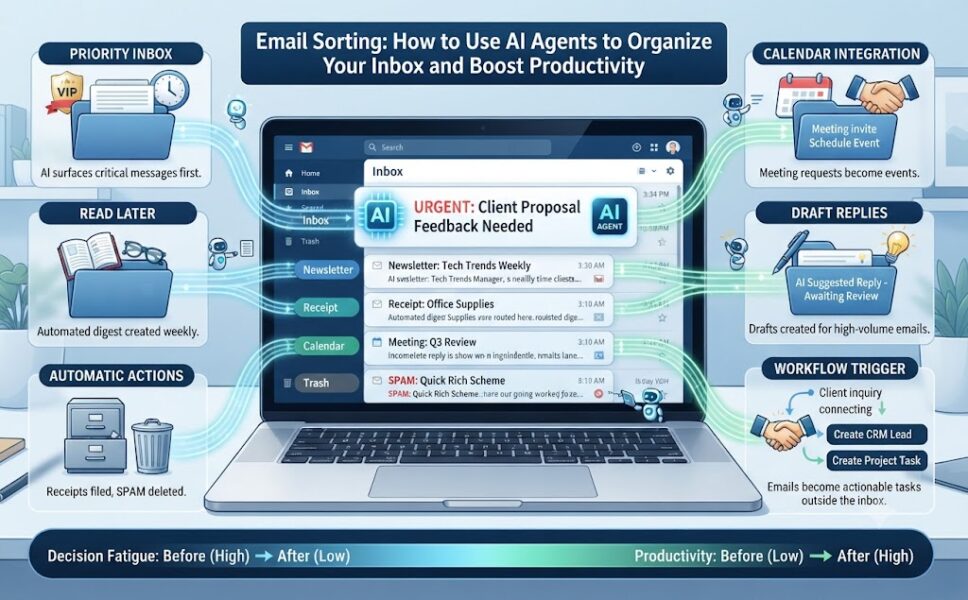
AI Email Sorting is the process of using artificial intelligence to automatically organize, categorize, prioritize, summarize, and route incoming emails based on their content, sender, urgency, and your past behavior.
Instead of relying on simple keyword-based filters, AI understands the meaning and intent behind each email.
For example, an AI system can distinguish between:
- An urgent customer complaint
- A monthly newsletter
- An invoice requiring approval
- A meeting invitation
- A sales inquiry
- A promotional advertisement
- A project update
- A personal email
The AI then decides what should happen next based on rules you’ve approved.
For example, it may:
- Mark an email as urgent
- Add labels automatically
- Move newsletters into a reading folder
- Draft a reply
- Archive promotional emails
- Create a task inside Asana or Trello
- Add customer information into a CRM
- Notify you about VIP senders
- Schedule calendar events
Unlike traditional inbox filters that rely on exact sender addresses or keywords, AI continuously improves by learning from your corrections and email habits.
What Is an AI Email Agent?
An AI email agent is software that works in the background to monitor your inbox and automatically perform actions based on predefined instructions and machine learning.
Unlike AI chatbots that wait for prompts, AI agents proactively analyze incoming emails as they arrive.
They examine:
- Sender information
- Subject lines
- Email content
- Conversation history
- Attachments
- Calendar availability
- Customer relationship data
- Previous interactions
- Priority level
- Deadlines
- Organizational policies
Using this information, the agent predicts what action should be taken.
Possible actions include:
- Labeling emails
- Prioritizing messages
- Summarizing conversations
- Drafting responses
- Archiving newsletters
- Flagging urgent requests
- Assigning tasks
- Scheduling meetings
- Routing emails to team members
- Creating CRM records
- Triggering workflows
The best AI agents continuously improve after observing your corrections.
Why Email Sorting Matters
Email has become much more than communication.
It is now where businesses receive:
- Customer requests
- Sales leads
- Vendor invoices
- Legal documents
- HR notifications
- Meeting invitations
- Marketing reports
- Internal collaboration
Without an organized inbox, professionals waste significant time simply deciding what deserves attention.
Poor email management often leads to:
- Missed deadlines
- Lost sales opportunities
- Delayed customer responses
- Forgotten approvals
- Increased stress
- Reduced productivity
AI Email Sorting transforms the inbox into a prioritized task list instead of a cluttered storage area.
Benefits of AI Email Sorting
Saves Time
Instead of manually reviewing every email, AI automatically identifies important messages and filters out distractions.
Many users save several hours each week simply by eliminating repetitive inbox management.
Reduces Decision Fatigue
Every email requires a decision.
AI removes thousands of small decisions by automatically sorting messages into meaningful categories.
Improves Response Time
Important emails from clients, managers, or customers reach the top of your inbox immediately.
This helps reduce delayed responses and improves customer satisfaction.
Prevents Missed Opportunities
AI highlights:
- Unanswered client questions
- Pending approvals
- Follow-up reminders
- Sales inquiries
- Time-sensitive requests
These messages are less likely to disappear beneath newsletters and promotional emails.
Keeps Teams Organized
Businesses can automatically route emails into:
- Project management software
- Helpdesk platforms
- CRM systems
- Accounting software
This eliminates manual data entry.
Improves Focus
Instead of constantly checking email throughout the day, AI organizes everything into actionable categories.
You spend less time searching and more time completing meaningful work.
How AI Email Sorting Works
Modern AI email systems combine several technologies.
Natural Language Processing (NLP)
NLP helps AI understand:
- Intent
- Tone
- Context
- Urgency
- Requests
- Questions
Instead of searching for keywords, it understands what the email actually means.
Machine Learning
The AI learns from:
- Which emails you open first
- Which messages you archive
- Which emails receive replies
- Which senders you prioritize
- Labels you manually apply
Over time, recommendations become increasingly accurate.
Context Awareness
Advanced AI examines:
- Previous conversations
- Attachments
- Calendar events
- Customer records
- Project history
This allows it to make better decisions than traditional inbox filters.
Workflow Automation
AI can trigger actions outside your inbox.
For example:
Customer email → CRM → Sales notification → Slack alert → Follow-up reminder
No manual work required.
Best AI Email Sorting Tools
1. Gemini in Gmail
Best For
Google Workspace users.
Key Features
- AI-generated thread summaries
- Smart reply suggestions
- Help Me Write
- Inbox prioritization
- Calendar integration
- Google Drive context
Advantages
- Native Gmail integration
- Strong security
- Minimal setup
- Excellent Workspace compatibility
Limitations
- Premium features require paid Workspace plans
- Occasionally misinterprets long conversations
- Limited customization compared to third-party tools
2. Microsoft Copilot in Outlook
Best For
Organizations using Microsoft 365.
Key Features
- Draft emails
- Summarize conversations
- Meeting recaps
- Calendar integration
- Microsoft Graph intelligence
- Attachment summaries
Advantages
- Deep Microsoft integration
- Enterprise-grade security
- Access to Teams and SharePoint context
Limitations
- Requires Microsoft 365 Copilot licensing
- Depends on existing Microsoft permissions
3. Superhuman
Best For
Professionals handling multiple inboxes.
Features
- AI summaries
- Instant replies
- Keyboard shortcuts
- Follow-up reminders
- AI search
- Multiple account support
Pros
- Extremely fast interface
- Excellent productivity features
- Advanced email triage
Cons
- Premium pricing
- Supports only Gmail and Outlook
4. SaneBox
Best For
Automatic inbox cleanup.
Features
- Smart folders
- Newsletter filtering
- One-click unsubscribe
- Snooze reminders
- Attachment management
Advantages
- Works with almost any email provider
- Easy setup
Drawbacks
- Limited AI writing
- Less suitable for enterprise workflows
5. Clean Email
Best For
Bulk inbox cleanup.
Features
- Mass archiving
- Automatic labeling
- Smart folders
- Unsubscribe management
- Inbox pause mode
Advantages
- Excellent for cleaning old inboxes
- Supports many email providers
Drawbacks
- No AI writing assistant
- Requires manual rule creation
6. Mailbutler
Best For
Professionals wanting AI inside existing email clients.
Features
- Email scheduling
- Templates
- Tracking
- AI writing
- Signature management
Pros
- Works with Apple Mail, Gmail, and Outlook
- Easy installation
Cons
- Feature differences across platforms
- Premium AI tools require higher-tier plans
7. Zapier AI Workflows
Best For
Business automation.
Features
- AI email parsing
- Workflow automation
- CRM integration
- Task creation
- Multi-app connections
Advantages
- Connects thousands of business apps
- Extremely flexible
Limitations
- More complex setup
- Requires workflow planning
How to Set Up AI Email Sorting
Step 1: Audit Your Inbox
Before enabling AI, understand your current email habits.
Ask yourself:
- What types of emails arrive daily?
- Which messages require responses?
- Which emails can be archived immediately?
- What wastes the most time?
Group emails into categories.
Examples:
- Reply Today
- Important
- Read Later
- Newsletters
- Receipts
- Clients
- Vendors
- Team
- Personal
Step 2: Choose the Right AI Tool
Select software based on:
- Email platform
- Budget
- Security requirements
- Business size
- Automation needs
Native tools work well for simplicity.
Third-party tools provide greater customization.
Step 3: Create Smart Labels
Build labels around actions instead of topics.
Examples include:
Urgency
- Immediate
- Today
- This Week
- Archive
Relationship
- Client
- Manager
- Team
- Vendor
- Unknown
Task
- Reply
- Approve
- Review
- Schedule
- Delegate
- Pay
Context
- Marketing
- Sales
- Finance
- HR
- Project Alpha
Keep your label system simple.
Most professionals need fewer than fifteen labels.
Step 4: Write Clear Rules
Examples:
“If a VIP client asks a question, label it Reply Today.”
“If an email contains invoices, move it to Finance.”
“If an email is a newsletter, send it to Weekly Reading.”
Specific rules perform better than broad rules.
Step 5: Test Before Automating
Test your AI on historical emails.
Review:
- Incorrect labels
- Missed priorities
- False positives
- Misclassified conversations
Adjust rules accordingly.
Step 6: Automate Low-Risk Tasks First
Good starting automations include:
- Labeling
- Summaries
- Newsletters
- Reminders
- Draft responses
Delay high-risk actions until you’re confident.
Avoid automating:
- Permanent deletion
- Sending replies
- Customer record updates
- Invoice payments
Step 7: Keep Human Approval
Require approval before AI:
- Sends emails
- Deletes messages
- Shares confidential information
- Updates financial records
Human oversight prevents costly mistakes.
Step 8: Train the AI Weekly
Review mistakes regularly.
Correct:
- Wrong labels
- Missed priorities
- Poor summaries
- False urgency
Small corrections significantly improve long-term accuracy.
Step 9: Connect Email to Business Workflows
The greatest productivity gains come from automation beyond the inbox.
Examples include:
- Customer inquiry → CRM
- Support request → Helpdesk
- Invoice → Accounting software
- Lead email → Sales pipeline
- Meeting request → Calendar
This removes repetitive manual work.
Email Sorting Best Practices
Keep Every Action Reversible
Never allow permanent deletion initially.
Instead:
- Use AI Archived labels
- Keep recovery folders
- Review changes weekly
Protect Sensitive Information
Limit AI access to only necessary folders.
Avoid granting access to:
- Legal files
- HR records
- Medical information
- Executive communications
Review permissions regularly.
Watch for Prompt Injection Attacks
Some malicious emails attempt to manipulate AI by embedding hidden instructions.
Never allow AI agents to blindly execute instructions contained within email messages.
Always validate actions against predefined rules.
Track Performance
Measure success using metrics such as:
- Reduced inbox size
- Faster response times
- Fewer missed follow-ups
- Less time spent reading email
- Improved customer response rates
Review performance monthly.
Common Mistakes to Avoid
Many professionals make the same mistakes when adopting AI Email Sorting.
Avoid:
- Creating too many labels
- Automating email deletion too early
- Allowing AI to send emails without review
- Ignoring privacy settings
- Skipping testing
- Overcomplicating workflows
- Failing to update automation rules
Start with simple automations and expand gradually.
Frequently Asked Questions (FAQ)
Is AI Email Sorting safe?
Yes, provided you use trusted tools, review privacy settings, and avoid giving unnecessary permissions. Human approval should remain in place for sensitive actions.
Can AI automatically reply to emails?
Yes. Many AI tools can draft or send replies. For business communication, it’s generally safer to review drafts before sending.
Does AI Email Sorting work with Gmail and Outlook?
Yes. Gmail offers Gemini, Outlook includes Microsoft Copilot, and many third-party tools support both platforms.
Can AI organize years of old emails?
Yes. Tools like Clean Email and SaneBox can analyze and organize large email archives, applying labels, folders, and cleanup rules in bulk.
Will AI replace email management completely?
No. AI excels at organizing, prioritizing, and automating repetitive tasks, but people should still make decisions involving legal, financial, confidential, or high-impact communications.
Conclusion
AI-powered Email Sorting is changing how professionals manage their inboxes by reducing clutter, improving response times, and automating repetitive work. Instead of spending hours manually reviewing every message, AI email agents can identify priorities, summarize conversations, organize messages into actionable categories, and integrate your inbox with business tools like CRM systems and project management platforms.
The most effective approach is to start with low-risk automations such as labeling, summarizing, and prioritizing emails. As your confidence grows, you can expand into workflow automation while maintaining human oversight for actions involving sensitive information, financial transactions, or outgoing communications.
When implemented thoughtfully, AI Email Sorting transforms your inbox from a source of distraction into a streamlined productivity system that helps you focus on the work that matters most.