



How to Connect ChatGPT or Claude to Excel and Google Sheets to Automate Everyday Workflows 2026

Artificial intelligence is no longer just an experimental chat interface; it is now natively embedded within the core infrastructure of modern office suites. For professionals handling data across the United States, the days of writing complex, nested formulas or manually sanitizing thousands of data rows are over.
With the latest 2026 spreadsheet-native integrations launched by OpenAI and Anthropic, users can deploy ChatGPT and Claude directly inside Microsoft Excel and Google Sheets. This guide covers exactly how to install these official tools, compare their features, and use them to automate repetitive data tasks.
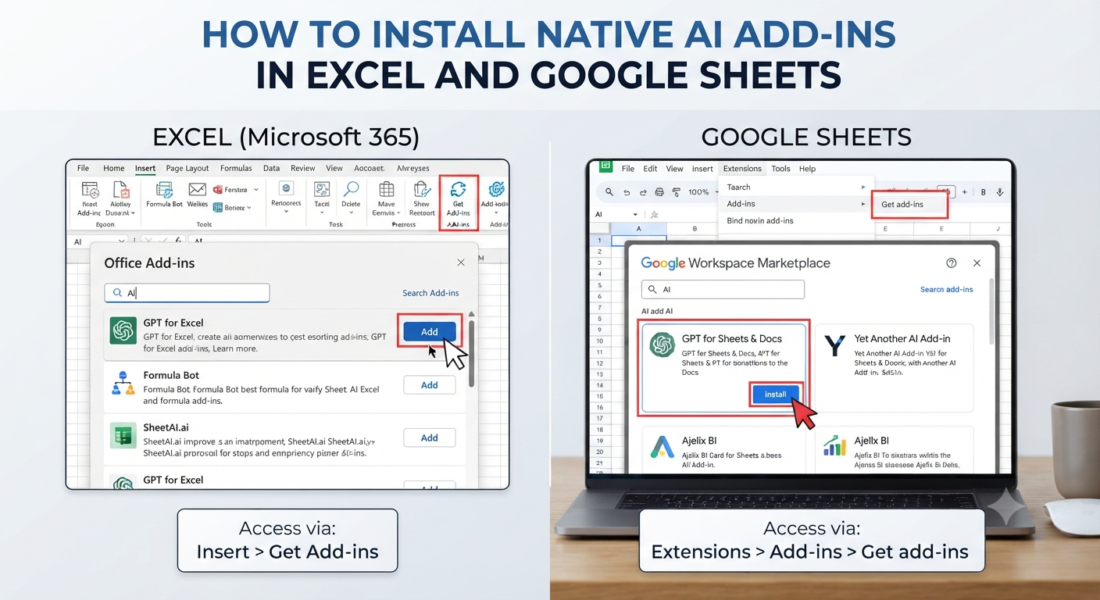
🛠️ How to Install Native AI Add-ins in Excel and Google Sheets
By 2026, connecting AI to your workbooks will not require bespoke scripts or third-party API setups. Both OpenAI and Anthropic offer secure, platform-native add-ins that open in a side panel alongside your spreadsheets.
1. Activating ChatGPT (Powered by GPT-5.4)
The official ChatGPT for Excel and Google Sheets add-in allows the model to interact dynamically with your active workbook, meaning it can read cross-tab configurations, generate formatting, and safely edit data with your confirmation.
- For Microsoft Excel (Desktop or Web): Open Excel $\rightarrow$ Navigate to the Home tab $\rightarrow$ Click Add-ins $\rightarrow$ Search for
"ChatGPT"(Published by OpenAI, LLC) $\rightarrow$ Click Add and sign in. - For Google Sheets: Open a sheet $\rightarrow$ Click Extensions $\rightarrow$ Add-ons $\rightarrow$ Get add-ons $\rightarrow$ Search for
"ChatGPT"in the Workspace Marketplace $\rightarrow$ Install and authorize.
2. Activating Claude for Excel (Anthropic Ecosystem)
Anthropic’s official Claude for Excel add-in focuses heavily on financial modeling, advanced reasoning, and document analysis.
- Installation: Visit the Microsoft Marketplace or the in-app Add-ins store $\right arrow$ Search for
"Claude by Anthropic for Excel"$\right arrow$ Install and activate. - Pro Tip: You can open or close the Claude panel instantly using the 2026 native keyboard shortcut:
Ctrl + Alt + Con Windows orCtrl + Option + Con Mac.
📊 Platform Breakdown: ChatGPT vs. Claude vs. Microsoft 365 Copilot
Choosing the right tool depends on your data workflows and available subscription tier. Below is a comparative breakdown of how the native integrations perform under real enterprise workloads:
| Capability Metric | ChatGPT Sidebar Add-on | Claude for Excel / Office | Microsoft 365 Copilot |
| Best Analytical Use Case | Bulk data restructuring, macro scripting, ad-hoc natural language data queries. | Complex multi-tab financial modeling, deep data audits, investment analysis. | Cross-app data context (pulling numbers directly from Teams, emails, and corporate databases). |
| Cell Citation Clarity | Generates formula targets with basic step references. | Cell-level clickable citations. Displays the exact audit trail behind calculations. | Native highlight tags connected to the corporate Microsoft Graph. |
| Multi-Application Flow | Isolated to the open spreadsheet sidebar. | Shared Session Context. Can turn an Excel sheet into a PowerPoint presentation instantly. | Native ecosystem automation across the entire Windows OS. |
| Pricing Requirements | Available for Free/Plus/Pro/Enterprise (Free tier has limited agentic credits). | Paid only. Requires a active Claude Pro, Max, Team, or Enterprise subscription. | Requires an active corporate Microsoft 365 Enterprise license. |
⚡ 4 Step-by-Step Automation Blueprints
Once your sidebar is open, you can begin automating workflow sequences. Because these models are spreadsheet-aware, you can prompt them in plain English. For optimal results, execute these data automation steps in order:
1.Bulk Data Sanitization:Processing time: ~15-30 seconds.
Highlight your raw target column. In the sidebar panel, enter: “Clean column A. Strip all trailing white spaces, standardize text to Proper Case, isolate the area codes from the telephone strings, and log them into a new adjacent column.”
2.Context-Aware Formula Creation:Processing time: ~45 seconds.
To avoid syntax formatting errors, type: “Write an XLOOKUP formula for cell G2 that cross-references the Product SKU in C2 against our ‘Inventory_Master’ tab. Return the wholesale cost price, but wrap it in an IFERROR statement that returns ‘Check SKU’ if no match is found.”
3.Automated Content Marketing Extraction:Processing time: ~1-2 minutes.
Select rows containing item descriptions and type: “Read the product specs in Column D. Generate an optimized SEO Meta-Description limited to 155 characters in Column E and output a short 10-word social media caption in Column F for each corresponding row.”
4.Executive Summaries & Variance Checks:Processing time: ~2 minutes.
Highlight an entire financial statement or dataset. Type: “Review the variance columns between Q1 Projected and Q1 Actual. Generate a 3-bullet executive summary highlighting the top two expense overruns and explain the mathematical trend behind the margin squeeze.”
🔍 Visual Reference: Interface Setup
To ensure you have installed the correct software, verify that your active workspace mirrors the layout shown below. The native AI interface should operate completely within a dedicated secure sidebar panel without obscuring your master grid cells.
+-----------------------------------------------------------------------+
|  File   Home   Insert   Page Layout   Formulas   Data    [ChatGPT/Claude] | -> Ribbon Area
+------------------------------------+----------------------------------+
| A1: Inventory SKU Data             |  🤖 AI Assistant Sidebar (Native)|
+------------------------------------+                                  |
| [ SKU-001 ] [ Item A ] [ $12.50 ]  |  User:                           |
| [ SKU-002 ] [ Item B ] [ $45.00 ]  |  "Audit column C for pricing     |
| [ SKU-003 ] [ Item C ] [ $18.90 ]  |   anomalies and write a formula" |
|                                    |                                  |
|                                    |  AI:                             |
|                                    |  "I have verified the range.     |
|                                    |   Click [Apply] to insert the    |
|                                    |   =IFERROR(XLOOKUP(...)) logic." |
|                                    |                                  |
|                                    |  [ Apply Changes ]  [ Reject ]   |
+------------------------------------+----------------------------------+
🛡️ Critical Risk Management and Best Practices
While 2026 AI systems feature incredibly deep token context windows and low hallucination latency, you should still implement basic office data guards:
Respect Corporate Data Residency: If your organization processes regulated HIPAA data, PII, or financial records, confirm that your system administrator has toggled on Zero Data Retention (ZDR) or deployed the integration via isolated enterprise API endpoints to prevent external server logging.
Verify Formula Syntax Precedents: AI handles language pattern extraction flawlessly, but it can still miss structural logic errors on massive datasets. Always spot-check cell formulas on a sandbox sheet before deploying them to live production records.
Sandbox Boundaries: Native add-ins do not support the automated execution or modification of legacy Excel VBA macros due to cloud container security controls. If you require advanced script automation, ask the AI tool to draft the raw VBA block code first, then manually paste it into your Developer Console.